How to Authorize Walmart Store in Alleasy OMS
Complete guide to connect your Walmart store with OMS
1. Overview
Definition: Connect your Walmart store with OMS for automatic order sync and unified management.
Benefits: Auto-sync orders, process orders in OMS, set automatic shipping rules for improved efficiency.
2. Authorization Steps
2.1 Login to Walmart Developer Portal
Go to Walmart Marketplace Group, click My Account, select Marketplace, login with credentials.
2.2 Get API KEY
a. Go to Key Management page to get API KEY.
b. When creating, select "LingXing ERP" as Solution Provider, create New Key, copy Client ID and Client Secret.
c. Enable permissions in the generated Key. Recommended to enable all permissions.
Troubleshooting:
- If authorization code unavailable, verify copied text is correct (paste to notepad first)
- Client ID and Client Secret should be different values
- Try resetting authorization code if still unavailable
- Generate new key with all permissions if multiple retries fail
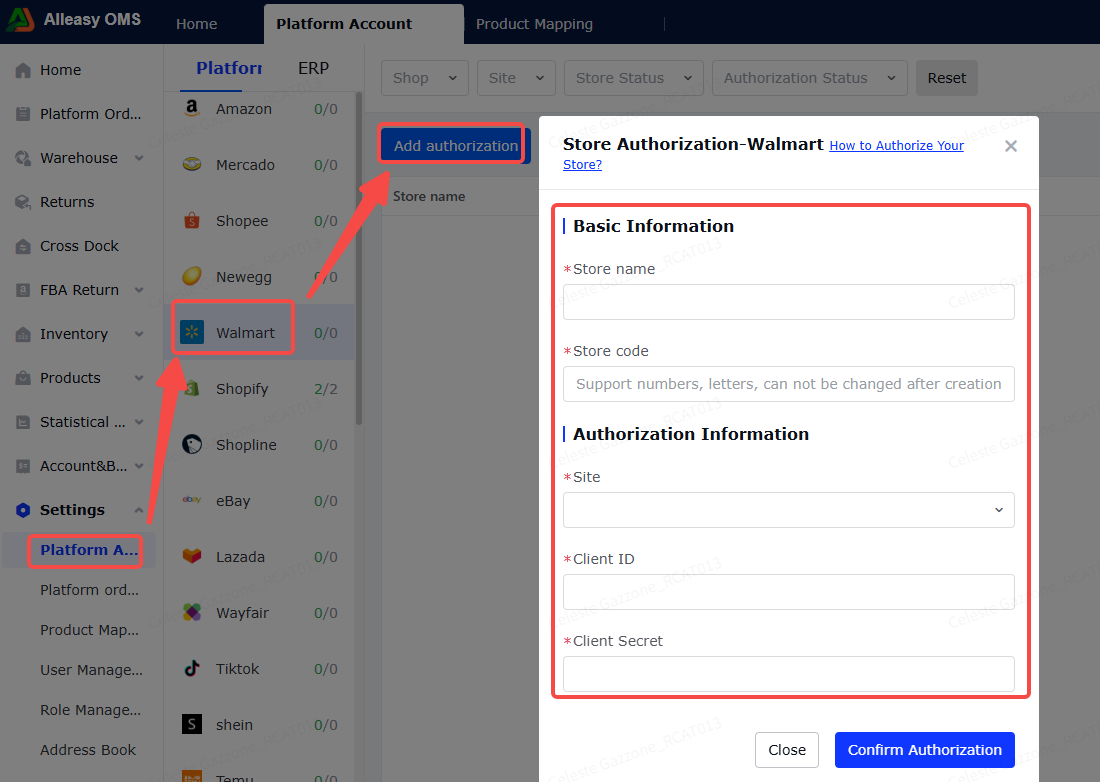
2.3 Fill Authorization Info in OMS
Path: OMS > System Settings > Platform Authorization > Walmart > Add Authorization
- Basic info: Custom fields (can match platform store info)
- Authorization info: Walmart only supports US site. Paste Client ID and Client Secret.
2.4 Set Up Product Mapping
Path: System Settings > Product Mapping > New/Import
- Ensure OMS has created corresponding product SKUs
- Ensure Walmart product info has SKU filled in
- For combination products, fill specific mapping quantities
2.5 Platform Order Operations
- First authorization pulls orders from 3-5 days before store creation
- Subsequent syncs every 15 minutes (last 2 days)
- Click [Manual Sync] for immediate sync
3. Additional Information
3.1 Important Notes
- Sync Order Status: Walmart only supports self-fulfilled orders (shipNodeType = SellerFulfilled)
- Order status must be "Created" or "Acknowledged" to sync to OMS
4. Common Issues
Q1: Does Walmart support platform labels?
A: Yes. After purchasing labels in backend, select channel that retrieves platform labels in OMS.
A: Yes. After purchasing labels in backend, select channel that retrieves platform labels in OMS.
Q2: Can tracking numbers from warehouse channels be uploaded to Walmart?
A: Yes, tracking numbers auto-upload to Walmart store.
A: Yes, tracking numbers auto-upload to Walmart store.
Q3: Authorization failed?
A: Ensure using PRODUCTION KEYS (not SANDBOX KEYS) for authorization.
A: Ensure using PRODUCTION KEYS (not SANDBOX KEYS) for authorization.
Q4: Using Ziniao browser - Client ID and Client Secret show same value?
A: Ziniao encrypts password fields. Press F12, click arrow icon, hover over input field, double-click value, copy the value.
A: Ziniao encrypts password fields. Press F12, click arrow icon, hover over input field, double-click value, copy the value.