How to Authorize TikTok Store in Alleasy OMS
Complete guide to connect your TikTok store with OMS
1. Overview
Definition: Connect your TikTok store with OMS for automatic order sync and unified management.
Benefits: Auto-sync orders, process in OMS, set automatic shipping rules.
2. Supported Sites and Store Types
| Region | Store Types |
|---|---|
| US | Cross-border, Local |
| UK | Cross-border, Local |
| Mexico | Local |
| Germany, France, Italy, Spain, Ireland | Cross-border (incl. pop), Local |
| Indonesia, Malaysia, Philippines, Singapore, Vietnam, Thailand, Japan | Cross-border, Local |
| Brazil | Local |
Note: For cross-border stores, select "Asia seller—Chinese mainland and the Hong Kong SAR (Cross-Border only)". For local stores, select the corresponding country.
3. Authorization Steps (US Example)
3.1 Fill in Seller SKU
Ensure TikTok store products have seller SKU filled in before authorization.
3.2 Confirm TikTok Store Type
Path: TikTok Backend > My Account > Seller Profile > Seller Type
3.3 Login to OMS and Fill Authorization Info
Path: OMS > System Settings > Platform Authorization > TikTok > Add Authorization
- Basic info: Custom fields for OMS display
- Authorization site: Must match store type
- Can specify multiple order statuses to sync
- Fill "Store Warehouse Code" to sync specific warehouse orders
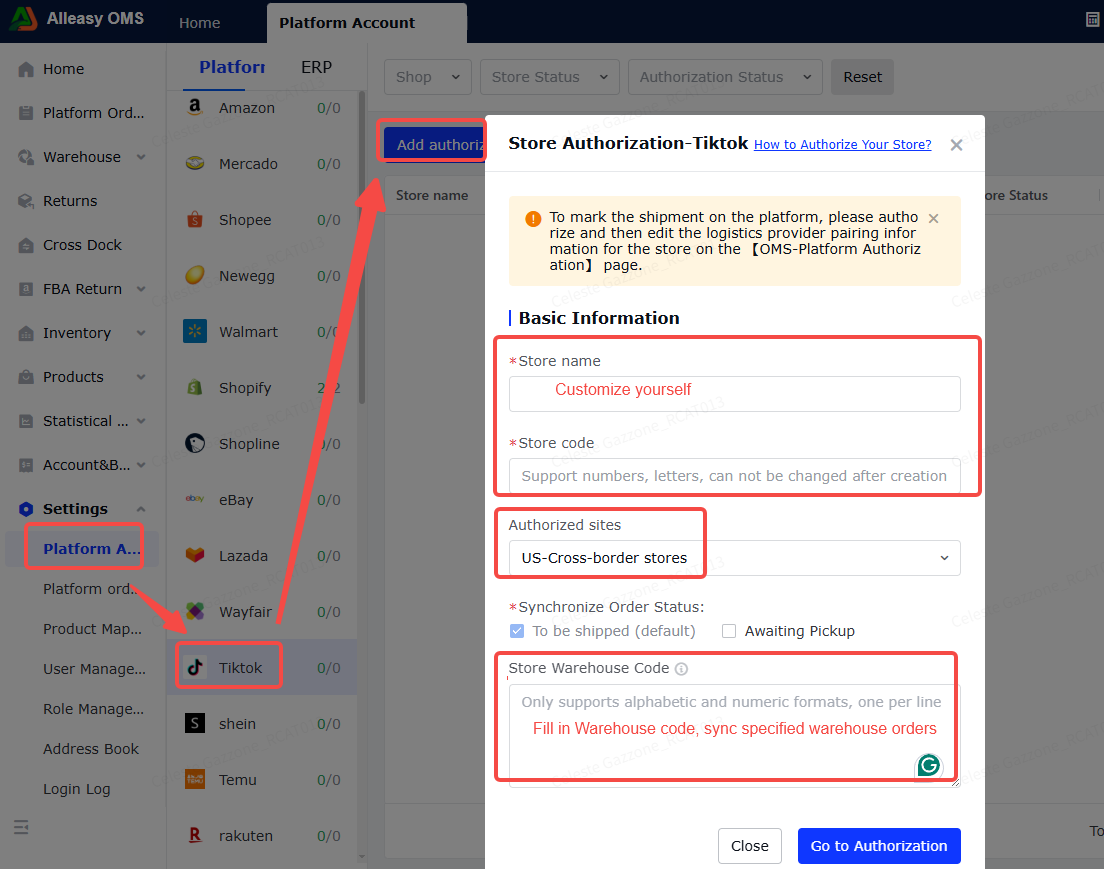
3.4 Complete Authorization on TikTok Platform
Cross-border: Asia seller > Chinese mainland and HK SAR (Cross-Border only) > Next
US Local: North America seller > United States > Next
3.5 Login to TikTok Account
Use store main account to login.
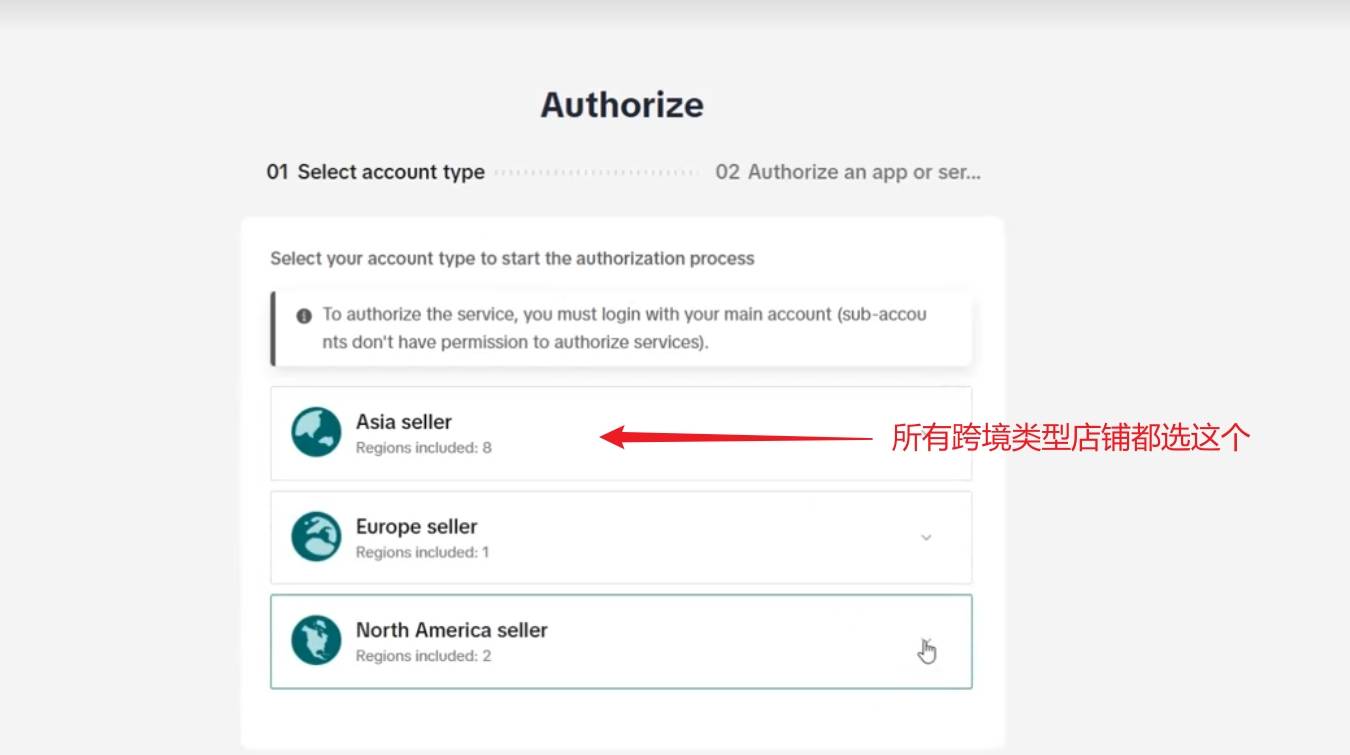
3.6 Confirm Authorization
Confirm "target shop" matches the OMS authorized store account name.
3.7 Edit Logistics Provider Mapping (Required)
Path: OMS > Platform Authorization > Select store > Operations > Edit Logistics Provider Mapping
Map platform logistics providers to system logistics providers (carriers).
3.8 Set Up Product Mapping (Required)
Path: OMS > System Settings > Product Mapping > New
- Ensure OMS has created corresponding product SKUs
- Ensure TikTok product info has seller SKU filled in
- Quantity = conversion coefficient (NOT inventory quantity)
4. Common Issues
Q: Platform SKU shows as numbers instead of seller SKU?
A: If seller SKU wasn't filled, system defaults to SKU ID. If filled later, pending orders will re-sync.
A: If seller SKU wasn't filled, system defaults to SKU ID. If filled later, pending orders will re-sync.
Q: OMS doesn't sync TikTok orders?
A: Check: ① Order status must be AWAITING_SHIPMENT ② Warehouse ID must match ③ Store account must match.
A: Check: ① Order status must be AWAITING_SHIPMENT ② Warehouse ID must match ③ Store account must match.